The Land of ‘Up’

Hello, Dear Readers!

Marcia here.  I’ve been having a delicious conversation – in poems – with a friend and I wanted to share one segment of that with you!  Enjoy!

wiggles & jiggles & giggles galore
laughed ever so hard & still wanted more
so in order to keep the momentum flowing
i thought to record what i thought to be knowing
as i reached for a pen something soft i did touch
it startled me ever so, ever so, ever so much
that i started to giggle all over again
realizing where i was now & where i had been
my feet had been planted quite firm on the earth
yet with all of our banter, camaraderie, mirth
bubbles of giggles expanded inside
and with highest vibrations taken me for a ride
with my head in the clouds and my toes in the sea
what touched me was water, yes water! you see
and i know that you know what i know to be true
’cause we live magic lives, we decidedly do
the water of life fills our glorious cup
for you see we are blessed in the world of UP
In Light and such glorious Laughter!
Sending Rainbow Hugs your way!
Marcia 🙂

The Many Faces of Lightroom Presets: Export Module

Hi Folks:

This is part 5 of a 5-part series on Lightroom presets. The segments are:

Export Module

Well, we’ve come full circle. Your images have been imported, selected, keyworded, marked, processed, output, etc. and none of them have been touched by Lightroom (except if you specifically instructed to delete images from the hard drive). The most common way of showing your images – whether in an online gallery like Flickr, Smugmug or 500px, on a site like Google+ or Facebook or simply on a flash drive or by e-mail is to export them from Lightroom. When you choose to export an image, Lightroom takes the initial information from the image file, applies the Develop settings and other changes you’ve made and creates a copy of each image that is then exported to an external plugin, a publish service, website, hard drive or e-mail location. While Photoshop has a facility to export multiple sizes of an image or image simultaneously, Lightroom does not. Lightroom does however allow you to create presets with various export options. Continue Reading →

The Many Faces of Lightroom Presets: Slideshow, Print and Web Modules

Hi Folks:

This is part 4 of a 5-part series on Lightroom presets. The segments are:

Slideshow/Print/Web Modules

The Slideshow, Print and Web modules all use presets in a similar manner, although the outputs of each are quite different. In these modules the presets are called Templates, and in each module Lightroom ships with a certain set of standard templates. One can also create user templates based on the sliders in the right panel, and/or download presets online. Templates for each module are available for free and in some cases for sale. In each module one can also create a ‘Saved’ output – i.e. a Saved Slideshow, a Saved Print or a Saved Web Gallery, and in doing so Lightroom will create a speciall Collection that combines the settings for that output module with the image(s) associated with it. As with the Book module, these Collections are merely collections of images and more can be added or images removed. Continue Reading →

The Many Faces of Lightroom Presets: Map and Book Modules

UPDATE: December 12, 2018:

As of November 30, if you have any version of Lr older than Lr 8 CC, the Maps module will no longer work. As I understand it, Google updated their API key and Adobe had already claimed it would no longer support older versions. So, if you’re renting Lr via subscription, run the updater and it should be all good. If you have a standalone version of Lr, all is not lost. Jeffrey Friedl has a plugin for Lr that enables geolocation support and is much more powerful than the Lr Map module was anyway. More here:

Jeffrey’s “Geoencoding Support” Plugin for Lightroom

_____

Hi Folks:

This is part 3 of a 5-part series on Lightroom presets.  The segments are:

Map Module

The Map module doesn’t use presets in the way that the previous modules have, but there is one facility for presets in the Map module called ‘Saved Locations’. If you’re familiar with the Map module (if you’re not, you may want to read our Lightroom, Geolocation and .GPX files post) you know that there are several ways to add geolocation data to your images and associate them with Lightroom. One of these is to select known areas and to mark them as ‘Saved Locations’. Continue Reading →

The Many Faces of Lightroom Presets: The Develop Module

Hi Folks:

This is part 2 of a 5-part series on Lightroom presets.  The segments are:

Develop Module

As mentioned in the previous post, there are a number of sites devoted to Develop presets, some of which are free and some of which are for sale. There are actually two (three) different presets in the Develop module. One set of presets is for the sliders in the right panel of the Develop module and the other (two) are for the sliders in the Adjustment Brush Tool and the Graduated Filter tool (although these both share the same presets).
Continue Reading →

The Many Faces of Lightroom Presets: The Import and Library Modules

Hi Folks:

If you mention the words ‘Lightroom’ and ‘preset’ in the same sentence, odds are pretty good that the person is referring to Lightroom’s ‘Develop presets’.  There are a number of sites devoted to sharing and/or selling Develop presets; ‘Lightroom Queen’ Victoria Brampton has an excellent list of such sites here and you can also check out the list of over 200 website links in our ‘Lightroom Links‘ post.  For those who haven’t used them, presets are ways of assigning a series of steps or actions to a one-click movement.  I have a number of Develop presets installed on my computer and I sometimes use them for inspiration when I’m stuck on an image that I’m not sure what to do with, but I rarely use them without tweaking them a bit.  We’ll get to Develop presets in their own time, but there are many, many other presets in Lightroom that can make your workflow smoother and more efficient and I thought I’d highlight a few of them based on each of Lightroom’s modules.  I wrote this originally as one post, but since it’s over 3500 words I thought I’d break it up into segments.  They are:

Continue Reading →

Children of Peace

Hi Folks:

This is a very short post, and really just a shout out to some amazing people to help raise some awareness of the project with which they are involved.  We heard about it from the creative folks at Insivity in their latest newsletter, and the possibility is so beautiful it really must be shared.  Today also marks the third day of ‘Random Acts of Kindness Week‘ so the timing is entirely appropriate!  There are so many places where this idea could be applied. Not going to bog this down with too many words… just follow the links and be inspired.

Hugs,
M&M


* (with thanks to Finn Hayden of Streaming Movies Right for letting us know about the correction to this URL)

Snapseed for Cell Phone Photography

Hi Folks:

There’s a saying among photographers that the best camera is the one you have with you in the moment.  To that end, both Marcia and I prize our Android-based cell phones, and Marcia especially has a certain notoriety among our photo group for her landscape and macro cell phone photography.  We’re not personally fans of the ‘retro’ look offered by programs like Instagram, and although we do use Camera360 Ultimate on both of our phones, most of the time we shoot the images as ‘unprocessed’ as possible and do post-processing work in Lightroom.  There are times, however, when one simply wants to be able to make and share an image without having to run it through a computer first.  Enter ‘Snapseed‘, from Nik Software. Continue Reading →

Photo of the Month – Ocean Waves

Hi Folks:

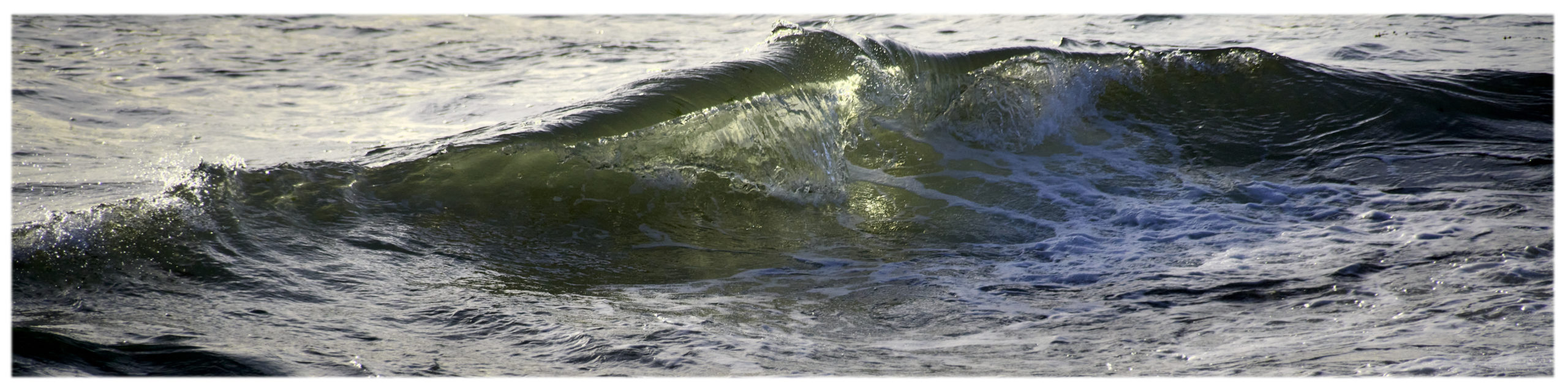
I didn’t do a lot of photography this past month, but did escape down to the shore for a bit one afternoon. I love the endless patterns in the way the water meets the shore, and have photographed it with varying degrees of success. Today’s ‘photo of the month’ is one of these but processed a bit differently. Rather than trying to illustrate the water itself I played with the colours and contrast in Lightroom, adding a blue split tone value to the highlights to render an abstract image of swirls and shapes. Could be water… could be marble… could be…? I trust you’ll enjoy it.

Swirls

Now go out and make some photographs!

Hugs,
M&M

Eating Our Way Through Victoria…

Hi Folks:

We haven’t written one of these for a while, but we have been continuing to sample some of the best culinary experiences Victoria has to offer and we thought we’d suggest a few more.  If you’ve read our previous ‘Food‘ posts you’ll know that we don’t write about places where we’ve had a bad experience; many things can contribute to that – the chef’s day off, server having a bad day, etc.  However, with every recommendation our reputation goes with it, so we only write about places we’d be pleased to revisit.  Without further ado, and in no particular order:

1) My Thai Café

On Cook Street one block south of Fort, the My Thai Café is a little far north to be considered part of Cook St. Village, but it belongs in spirit at least.  At first glance the café doesn’t seem to offer much – it’s very small, and it’s certainly not fancy.  Don’t let looks deceive you, however.  The food there is excellent, and according to friends of ours who visit Thailand with some frequency, the My Thai Café has the most authentic Thai cuisine in Victoria.  We’ve been there a few times and have never been disappointed.  Thai food is spicy by nature, but they are more than happy to accomodate those who prefer ‘mild’ to ‘hot’.  Open for both lunch and dinner, the prices are reasonable, the service is open and friendly… well worth a visit!

2) Hot and Cold Café

Farther south on Cook St. is the Hot and Cold Café.  If the My Thai Café is small, the Hot and Cold Café is tiny – it might hold a dozen people, or a few more if the patrons are willing to get cozy.  The first time we went there with friends we weren’t even sure it was open, although the sign on the sidewalk assured us that it was (they’re open to 7 p.m. daily).  Put plainly, we hesitate to mention this restaurant only because it’s so small and once word of mouth gets out we expect the place to be jammed.  Simple fare – soups, salads, sandwiches, but exquisitely prepared and presented.  Each dish is truly a work of art, and the taste is to die for.  Be sure to try the rice pudding for dessert.  We’ll say no more, and leave you to discover the rest for yourself!

3) Millos Restaurant and Lounge

Located on Burdett St, just east of Douglas, Millos is a place we’ve often walked by and thought, ‘We should go there someday’.  To celebrate our 218th Monthaversary of being a couple, we did just that.  The name ‘Millos’ comes from the Greek word  for ‘windmill’, and it was this feature of the building that originally aroused our curiosity.

Millos has been in Victoria since 1978, and the owners are celebrating 47 years of marriage this month.  Congratulations to them both!  We were seated and served by Dora, one of the owners (her husband runs the kitchen).  A little spit of a thing, she effuses warmth and grace, making our evening a true pleasure.  We shared a Greek salad to start and although we ordered the large to share Dora advised against it, saying that it was a meal in itself.  She was right, and the small was just right for the two of us.  For the main course we both had lamb; Marcia had the roast lamb shank and I had the souvlaki.  Both were excellent, and the vegetables were done perfectly.  I’m a sucker for Greek coffee (unsweetened), and Marcia shared a bit of the galactobouriko I had for dessert.  At the end of the evening Dora came to give us a hug before we left!

4) The Noodle Box

Part of a chain of restaurants, The Noodle Box restaurant on lower Douglas St. is one of five locations in the Victoria area.  In a world where ‘fast food’ often means deep frying and empty calories, The Noodle Box is a welcome exception.  With a generally ‘pan-Asian’ menu, The Noodle Box serves up a variety of satays, sir fry options, soups, curries and more.  Each order is made fresh, using ethically-sourced and healthy options wherever possible.  More nutrition information is available on their website.  Available for eat-in or take-out, even these choices are given a thought to the environment as the cardboard take-out containers can be cleaned and recycled and there is in-store composting for leftover food.  There’s a choice of reusable chopsticks for dining in and bamboo chopsticks for those taking their food away.  NB: the food can be prepared anywhere from ‘mild’ to ‘make my head explode’, but be aware that they tend to be a little generous with their chilies.  If you like hot food, you might want to try ‘medium’ or ‘medium hot’ on your first outing, just to be safe.  You can always add hot sauce. 😉

5) Olive the Senses

Victoria has so many great places to eat; we’re looking forward to exploring more of them! By the time you read this we’ll have taken in one of the free olive oil tastings at ‘Olive the Senses’, on the east side of the Hudson Bldg, something we’re looking forward to experiencing!!

Update: Well, we completed our tasting tour this afternoon… Steve (the owner) was unavailable, but were privileged to attend Annie’s first tasting tour!  She far surpassed our expectations (and our taste buds).  We had the chance to sample a number of single-origin and infused olive oils and both white and dark balsamic vinegars while we were there.  It was, in a word, a revelation.  We really had our eyes opened to both the international and national standards for ‘extra virgin’ olive oils, and what good oil should contain (and not contain), how to store it and more.  Informative, educational and entertaining, this shop well deserves a stop on every tourist’s agenda, and that of every island resident too.  We brought home a blood-orange infused olive oil and an espresso dark balsamic vinegar – quite a heavenly combination. 😀

As Julia Child would say, ‘Bon Appetit!’

Hugs,
M&M

P.S. You can read more of our Food posts and restaurant reviews here.